How Much Is Snapchat Plus?
Snapchat has become one of the most popular social media apps for sharing snaps, stories, and quick chats. But many users now want extra features, and that is where Snapchat Plus comes in.
If you are wondering how much Snapchat Plus costs, what features it includes, and whether it is worth paying for, this guide explains everything in simple words.
What Is Snapchat Plus?
Snapchat Plus is the premium subscription version of Snapchat. It gives users access to exclusive tools, early features, customizations, and special badges that normal users do not get.
It does not remove ads completely, but it unlocks several extra options that make the app more personalized and fun.
Snapchat launched this subscription for users who want more control over their experience inside the app.
Is Snapchat Premium the Same as Snapchat Plus?
Yes. When people search for Snapchat Premium, they are often referring to Snapchat Plus, Snapchat’s paid subscription service. The official name of the subscription is Snapchat Plus, which gives subscribers access to exclusive features, customization options, and early access to selected features.
So, if you see someone asking about Snapchat Premium, they may simply be using a different term for Snapchat Plus.
How Much Is Snapchat Plus?
The price of Snapchat Plus depends on the subscription plan you choose and sometimes your country or app store taxes.
Here are the most common pricing options in 2026:
| Subscription Plan | Estimated Price |
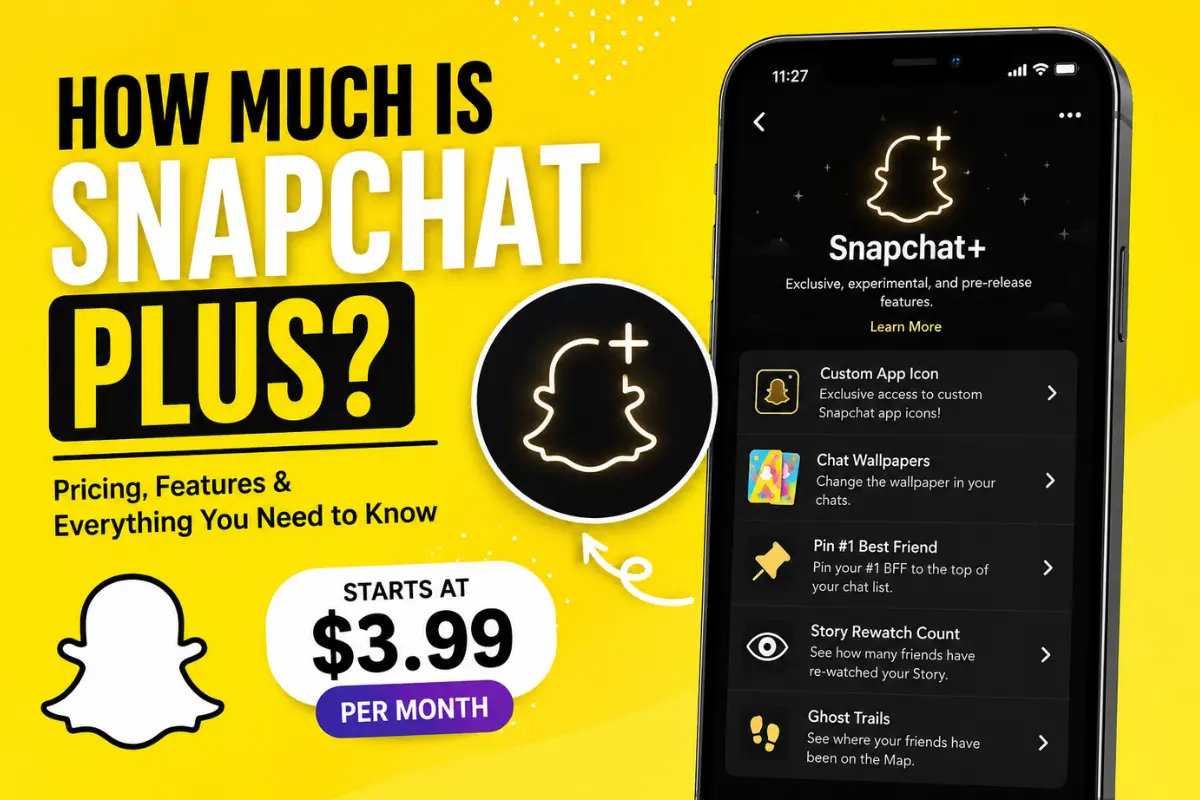
| Monthly Plan | Around $3.99 per month |
| 6-Month Plan | Around $21.99 |
| Annual Plan | Around $39.99 per year |
These prices may slightly change based on your region, Android or iPhone device, and local taxes.
If you choose the yearly plan, you usually save more money compared to paying every month.
Snapchat Plus Price in Different Countries
The subscription cost is not exactly the same worldwide. Snapchat adjusts prices depending on the country and currency.
United States
Users in the US usually pay around $3.99 monthly.
Pakistan
In Pakistan, the price can vary because Google Play and Apple App Store convert the amount into PKR. It may cost around PKR 1,100 to 1,300 monthly depending on exchange rates and taxes.
India
Indian users often pay around ₹49 to ₹79 monthly depending on promotions and app store pricing.
United Kingdom
UK users may pay around £3.99 monthly.
What Do You Get With Snapchat Plus Features?
Many people subscribe because of the exclusive features. Snapchat regularly adds new tools for Plus users.
Here are some popular Snapchat Plus features.
Custom App Icons
You can change the Snapchat app icon on your phone. This helps personalize your home screen with different colors and styles.
Snapchat+ Badge
Subscribers can display a special badge on their profile to show they are using Snapchat Plus.
Some users like this because it makes their profile stand out.
Story Rewatch Indicator
This feature shows how many friends rewatched your story.
It does not show exactly who rewatched it, but it gives you an idea of which stories are getting attention.
Pin a Best Friend
One of the most popular features allows you to pin your #1 best friend at the top of your chat list.
This makes it easier to quickly access conversations with close friends.
Ghost Trails
Ghost Trails lets you see the recent location history of friends who share their live location with you.
This works inside the Snap Map feature.
Early Access Features
Snapchat Plus users often get access to experimental features before regular users.
This is useful if you enjoy trying new Snapchat updates first.
Custom Notification Sounds
Subscribers can set unique notification sounds for specific friends or chats.
This small feature helps personalize notifications.
Chat Wallpapers
You can customize chat backgrounds with wallpapers and themes.
It gives conversations a more unique look.
Snapchat AI Features
Some AI-based tools and experimental features are also introduced first for Snapchat Plus members.
Snapchat continues expanding these premium features over time.
Snapchat Plus also includes features connected to the Snapchat Solar System, which helps users understand their friendship rankings in a fun way.
Is Snapchat Plus Worth It?
Whether Snapchat Plus is worth buying depends on how often you use Snapchat.
It May Be Worth It If:
- You use Snapchat daily
- You enjoy customizing apps
- You want early access features
- You care about profile appearance
- You like exclusive Snapchat tools
It May Not Be Worth It If:
- You rarely use Snapchat
- You only send basic snaps
- You do not care about customization
- You want ad-free social media
For casual users, the free version of Snapchat still works perfectly fine.
How to Subscribe to Snapchat Plus
Subscribing is simple and only takes a few minutes.
Step 1: Open Snapchat
Launch the Snapchat app on your phone.
Step 2: Tap Your Profile
Tap your Bitmoji or profile icon in the top-left corner.
Step 3: Find Snapchat+
Look for the Snapchat+ banner or subscription option.
Step 4: Choose a Plan
Select monthly, 6-month, or yearly subscription.
Step 5: Complete Payment
Use Google Play or Apple App Store payment options to finish the purchase.
Once payment is complete, premium features unlock instantly.
How to Cancel Snapchat Plus
You can cancel your subscription anytime. If you need help, follow this guide on how to cancel Snapchat Plus for step-by-step instructions.
On Android
- Open Google Play Store
- Tap your profile
- Go to Payments & Subscriptions
- Select Subscriptions
- Choose Snapchat Plus
- Tap Cancel Subscription
On iPhone
- Open Settings
- Tap your Apple ID
- Go to Subscriptions
- Select Snapchat Plus
- Tap Cancel
Your subscription usually stays active until the current billing cycle ends.
Does Snapchat Plus Offer a Free Trial?
Sometimes Snapchat provides free trials for new users.
The free trial period may vary depending on promotions or country availability.
Not every user sees the free trial option.
If available, Snapchat normally shows it before payment confirmation.
Can You Use Snapchat Without Snapchat Plus?
Yes, absolutely.
The regular version of Snapchat is still free to use.
You can send snaps, use filters, create stories, chat with friends, and use most core features without paying.
Snapchat Plus mainly adds bonus tools and personalization options.
Does Snapchat Plus Remove Ads?
No, Snapchat Plus does not completely remove ads from the app.
Some users mistakenly think it works like YouTube Premium or Spotify Premium, but Snapchat Plus focuses more on exclusive features instead of ad removal. If you want to learn more about how advertising works on Snapchat, check out this guide to Snapchat Ads Manager.
Difference Between Snapchat and Snapchat Plus
| Feature | Free Snapchat | Snapchat Plus |
| Send Snaps | Yes | Yes |
| Stories | Yes | Yes |
| Filters & Lenses | Yes | Yes |
| Custom Icons | No | Yes |
| Story Rewatch Count | No | Yes |
| Best Friend Pin | No | Yes |
| Early Features | No | Yes |
| Snapchat+ Badge | No | Yes |
Why Did Snapchat Launch Snapchat Plus?
Snap Inc. introduced Snapchat Plus to create a new revenue stream beyond advertising.
Subscription services are becoming common in social media apps.
Many platforms now offer premium memberships with exclusive features.
Snapchat Plus also helps the company test new ideas with loyal users before releasing them publicly.
Most Popular Snapchat Plus Features
Some features are more loved than others.
The most popular Snapchat Plus tools include:
- Best Friend Pin
- Story Rewatch Indicator
- Custom Icons
- Ghost Trails
- Chat Wallpapers
- Snapchat+ Badge
These features improve personalization and social interaction.
Tips Before Buying Snapchat Plus
Before subscribing, keep these things in mind.
Check Your Usage
If you open Snapchat many times daily, the subscription may feel more valuable.
Compare Monthly vs Yearly
The yearly plan often saves money long-term.
Look for Free Trials
You may get a free trial before paying.
Remember Features Change
Snapchat regularly adds and removes features, so the experience may evolve over time.
Common Questions About Snapchat Plus
Can Other People See I Have Snapchat Plus?
Yes, if you enable the Snapchat+ badge on your profile.
Is Snapchat Plus Available Worldwide?
It is available in many countries, but some regions may still not support it.
Can Teenagers Buy Snapchat Plus?
Yes, if they meet the app store age requirements and have payment access.
Does Snapchat Plus Improve Snap Score?
No, it does not directly boost your Snap Score.
Can I Refund Snapchat Plus?
Refund policies depend on Google Play Store or Apple App Store rules.
Final Thoughts
Snapchat Plus is a low-cost subscription for users who want extra customization and exclusive features inside Snapchat.
The standard price is usually around $3.99 monthly, while longer plans can help save money.
For heavy Snapchat users, the premium tools can make the app more enjoyable. But if you only use Snapchat casually, the free version is still more than enough.
Before subscribing, compare the features carefully and decide whether the extra tools match your needs.