What Does the Purple Circle Mean on Snapchat?
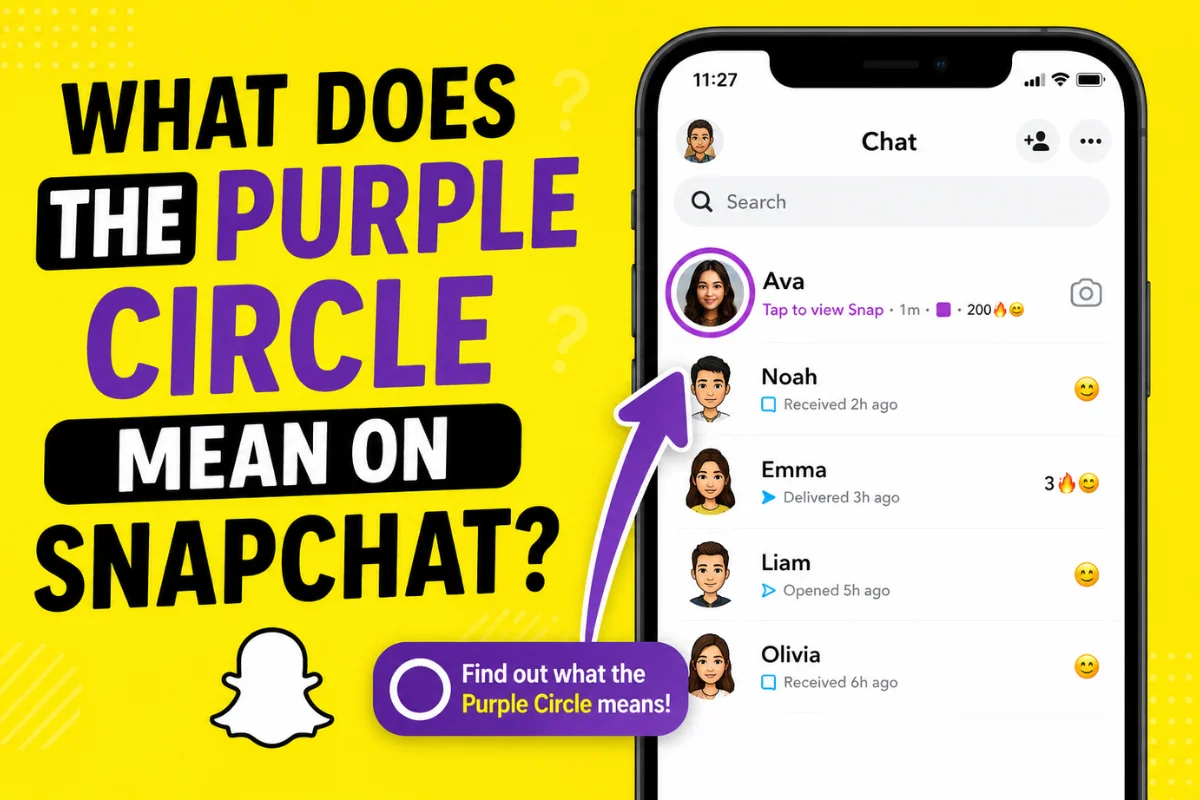
When you open Snapchat to check something and notice that purple circle again, it can feel unclear. There’s no message preview and no clear label. You might ask, “What does the purple circle mean on Snapchat?” Is it a private story or a new notification? The purple circle on Snapchat is simply a visual sign showing new camera-based story content.
This guide explains why it appears, what a purple ring around a Bitmoji means, and how it is different from other colors, including Snap Planets.
What Is the Purple Circle on Snapchat?
The purple circle is Snapchat’s way of showing that new camera-based content is available for you. It is not a message, not a friend request, and not a notification error.
Snapchat uses color signals so users can quickly understand what type of activity is happening without reading anything. Purple is used for snap-based actions, especially stories created using the camera.
Here is where many people get confused:
- Purple circle usually means an unviewed snap story
- Purple ring is another way people describe the same story outline
- Purple outline refers to the border style, not a different feature
Snapchat does not change the meaning, only the visual style. Other platforms often do not follow this system, which is why users think each version has a different meaning when it actually does not.
What Does the Purple Circle Mean on Snapchat Stories?
The purple circle on a Snapchat story means your friend has posted a new snap-based story that you have not watched yet. It is only connected to camera content, not chats or messages. Once you watch the full story, the purple circle usually disappears on its own.
The Exact Meaning of the Purple Circle on Stories
When you see a purple circle on a story, it means your friend has shared a new snap-based story that you have not watched yet. It is important to know what it does not mean:
- It is not related to chat messages
- It has nothing to do with screenshots
- It does not show typing or online status
Many users mix this up with chat indicators, especially when comparing it to the blue circle around a Snapchat story, but those are used for completely different actions.
When the Purple Circle Appears and Disappears
The purple circle appears as soon as a new story is posted and stays visible until you watch it. After you view it completely, Snapchat removes the indicator automatically.
- New story posted: purple circle appears
- Story viewed: purple circle disappears
Why Some Purple Circles Stay After Watching
Sometimes the purple circle does not go away, which creates confusion. This can happen because:
- App cache issues stop Snapchat from updating the story status
- Story updates add a new snap after you already watched the first one
- Sync delay causes visual lag, especially on slow internet
Purple Circle vs Other Snapchat Story Colors
Snapchat uses different colors to show what type of activity is happening. Many users miss this system, which is why the colors seem confusing. Once you understand it, you can recognize activity instantly.
Purple Circle vs Blue Circle on Snapchat
The purple circle is linked to camera-based stories, not conversations. The blue circle is connected to chat activity, while purple shows visual story content. These colors help you understand what is waiting without opening it.
Purple Circle vs Grey Circle
A purple circle shows an active, unviewed story. A grey circle appears when the story has already been watched or has expired, meaning nothing new is left to see. This helps users avoid opening stories again.
Does Color Change Based on Privacy or Friend Status?
Story colors do not show how close you are to someone or whether they are a best friend. Snapchat uses the same color system for everyone. Closeness or interaction is shown through other features, not story colors.
What Does the Purple Circle Around a Snapchat Bitmoji Mean?
When a Bitmoji has a purple border, it shows recent visual activity without sending a notification. It is just a simple highlight, not something urgent.
Purple Circle in the Stories Tab
If a Bitmoji has a purple circle in the Stories section, it means a friend has posted a new snap story. It is a visual reminder of fresh camera content.
Purple Circle in Quick Add & Friend Suggestions
If you see this icon in suggestions, it means you can view that person’s story even if you are not close friends yet. It does not include any hidden signals or friend requests.
Can You Interact with Purple-Circled Bitmojis?
Tapping the Bitmoji opens the story directly. Nothing else happens. It does not notify the person, track interest, or add them automatically.
What Does the Purple Circle With a Lock Mean on Snapchat?
The lock adds another layer of meaning. It shows that the story is limited to selected viewers chosen by the creator.
Purple Circle With Lock = Private Story
A purple circle with a lock means the story is private and shared only with a selected group. It is still a snap story but not visible to everyone.
Private Story vs Public Story
Public stories can be viewed by all friends or followers. Private stories are only visible to selected people. Private stories give more control to the user posting them.
Who Can See Your Locked Purple Circle Story?
Only the users chosen by the creator can see it. Snapchat does not automatically include friends. Access depends completely on the selected list.
How to Create, Edit, or Remove a Private Story
You can create one by choosing “Private Story” while posting. You can edit it anytime by adding or removing viewers. Changes happen immediately.
What Does the Purple Circle Mean on the “Added Me” Screen?
On this screen, the purple indicator shows that someone who added you has an active story. It is there to encourage interaction, not to show urgency.
Why Snapchat Uses Purple for Stories
Snapchat uses purple for camera-based actions because stories are built around snaps, not text. This helps users quickly separate visual content from chats. It is a design choice, not a hidden signal.
Common Myths About the Purple Circle Snapchat
Some users think the purple circle shows profile visits or real-time activity. This is not true. Snapchat uses different indicators for status, and they are not connect to story circles.
Purple Circle Not Showing or Not Disappearing?
- App cache issues can delay updates; clearing cache may help
- Outdated app versions may not refresh properly; updating can fix it
- Sometimes it is a server issue that resolves on its own
Does the Purple Circle Mean the Same on Android and iPhone?
Android Users
The purple circle appears mainly in the Stories section and around Bitmojis, sometimes with a slightly stronger outline. It may take longer to refresh in some cases.
iPhone Users
The purple circle looks smoother and refreshes faster. It usually disappears right after viewing the story. The meaning stays exactly the same.
FAQs
Does the purple circle mean someone added me?
No. It only shows a new story is available.
Can strangers see my purple circle story?
Only if it is public or visible in Quick Add. Private stories remain hidden.
Is a purple ring always related to a story?
Yes. It always represents camera-based story content.
Can I turn off purple story indicators?
No. You cannot hide them, but you can control who sees your story.
Does Snapchat notify me when I view a purple circle?
No. The creator only sees total views, not individual viewers.
Conclusion
The purple circle on Snapchat is simply a way to show that new camera-based story content is available. It does not relate to chats, friend requests, or hidden activity.
No matter where it appears—around a Bitmoji, in Quick Add, or in the Stories section—the meaning stays the same. Understanding this helps remove confusion and makes it easier to use Snapchat stories with confidence.