How to Make a Public Profile on Snapchat
If you use social media regularly, you’ve probably noticed creators sharing more content on Snapchat publicly. A public profile on Snapchat allows you to grow your audience, showcase your content, and get discovered by new followers beyond your friends list.
In this complete guide, you’ll learn how to create a public profile on Snapchat step by step, what requirements you need, and how to optimize your profile for better reach.
What is a Public Profile on Snapchat?
A public profile on Snapchat is a special profile that allows users to:
- Share stories publicly
- Gain followers (not just friends)
- Get discovered in search
- Post spotlight content
- Show highlights and saved stories
- Promote personal or business brand
Unlike a normal Snapchat profile, a public profile is visible to everyone on Snapchat (depending on privacy settings), making it perfect for influencers, creators, and businesses.
Requirements to Create a Public Profile on Snapchat
Before you can create a public profile, make sure you meet these conditions:
Basic Requirements:
- You must be at least 18 years old
- Your Snapchat account should be active for some time
- You must follow Snapchat community guidelines
- Your account should not be newly created (in some regions)
Additional Tips:
- Use a real Bitmoji or profile picture
- Have at least a few friends or activity on your account
- Keep your app updated to the latest version
Benefits of Having a Public Profile on Snapchat
Creating a public profile is not just about visibility—it comes with powerful features:
1. Grow Your Audience
You can gain followers from around the world, not just your friends.
2. Showcase Content
Post stories, highlights, and saved snaps in one place.
3. Get Featured on Spotlight
Your content can appear in Snapchat Spotlight, increasing reach.
4. Brand Promotion
Perfect for influencers, small businesses, and creators.
5. Analytics Access
You can track views, engagement, and performance.
Step-by-Step Guide to Make a Public Profile on Snapchat
Now let’s go step by step and create your public profile.
Step 1: Open Snapchat App
First, open the Snapchat app on your phone.
Make sure you are logged into your account.
📌 Tip: Always use the latest version of Snapchat for full features.
Step 2: Go to Your Profile
Tap on your Bitmoji or profile icon in the top-left corner of the screen.
This will open your Snapchat profile page.
Step 3: Find “Public Profile” Option
Scroll down and look for:
👉 “Create Public Profile”
If you don’t see it, it may be under:
- “Spotlight & Snap Map”
- Or “My Public Profile”
Step 4: Tap “Create Public Profile”
Click on the option and then tap:
👉 “Continue”
Snapchat will show you an introduction about public profiles.
Read it and proceed.
Step 5: Confirm Your Action
Snapchat may ask:
- “Create Public Profile?”
- Tap Create
This will activate your public profile instantly.
Step 6: Customize Your Profile
Now your public profile is created.
You can customize it by adding:
- Profile photo or Bitmoji
- Bio description
- Location (optional)
- Featured stories
- Saved content
Step 7: Add Public Stories
Go to your profile and tap:
👉 “Add to Public Story”
This allows your snaps to be visible publicly.
Step 8: Share Your Profile
You can now share your profile link with others:
- On Instagram
- On WhatsApp
- On other social media platforms
This helps you grow faster.
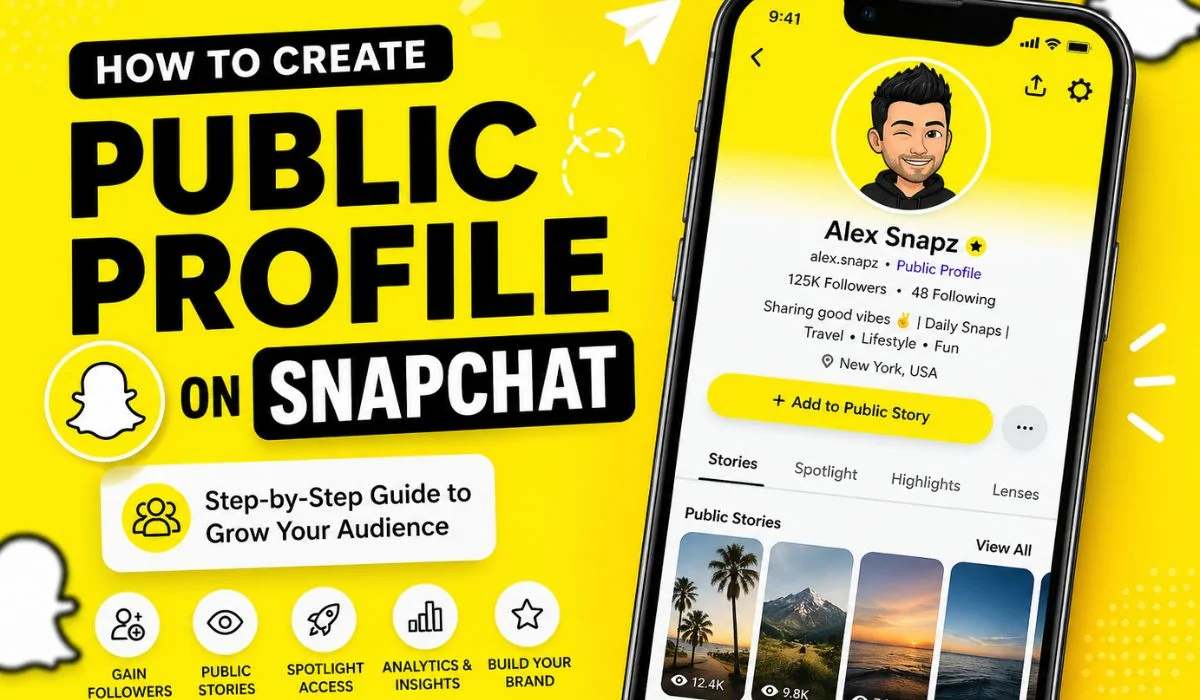
Featured Image: What a Snapchat Public Profile Looks Like
Here is a visual example of how a public profile appears:
How to Optimize Your Snapchat Public Profile
Creating a public profile is not enough—you need to optimize it for growth.
1. Use a Clear Profile Picture
Choose a high-quality Bitmoji or face photo.
2. Write a Good Bio
Your bio should explain who you are:
Example:
- “Travel lover 🌍 | Daily snaps | Creator”
- “Sharing lifestyle & fun moments”
3. Post Consistently
Post daily or weekly stories to stay active.
4. Use Spotlight
Upload creative videos to Snapchat Spotlight for more reach.
5. Engage With Audience
Reply to messages and interact with followers.
Common Problems and Fixes
1. “Create Public Profile” Not Showing
✔ Update Snapchat
✔ Check age settings
✔ Try reinstalling the app
2. Unable to Get Followers
✔ Improve content quality
✔ Post regularly
✔ Share profile on other platforms
3. Public Profile Option Missing
✔ Not available in some regions
✔ Account may be too new
Tips to Grow Faster on Snapchat Public Profile
Here are some expert tips:
✔ Post Trending Content
Use trending sounds and filters.
✔ Keep Stories Short
Short, engaging snaps perform better.
✔ Use Hashtags in Spotlight
They improve discoverability.
✔ Stay Active Daily
Consistency is key to growth.
✔ Collaborate with Others
Shoutouts and collaborations help gain followers.
Snapchat Public Profile vs Normal Profile
| Feature | Normal Profile | Public Profile |
| Visibility | Friends only | Everyone |
| Followers | Not available | Available |
| Spotlight Access | Limited | Full access |
| Growth Potential | Low | High |
Final Thoughts
Creating a public profile on Snapchat is one of the best ways to grow your online presence in 2026. Whether you are a creator, influencer, or just someone who wants to share moments publicly, this feature gives you powerful tools for visibility and engagement.
By following the steps above, you can easily set up your public profile and start building your audience today.