How to See Mutual Friends on Snapchat?
Snapchat is designed differently from most social media platforms. Unlike Facebook, it does not openly display friend lists or show a dedicated “mutual friends” section. This often leaves users wondering whether it’s possible to see mutual friends on Snapchat.
The short answer is no—Snapchat does not provide a feature that lets you view mutual friends directly. However, there are a few ways to identify shared connections using Snapchat’s built-in features.
In this guide, you’ll learn how Snapchat handles mutual friends, what information you can actually see, and the latest updates about friend suggestions in 2026.
Can You See Mutual Friends on Snapchat?
No, Snapchat does not allow users to see a list of mutual friends.
Unlike platforms such as Facebook or LinkedIn, Snapchat focuses heavily on user privacy. This means you cannot open someone’s profile and view who they are friends with.
Instead, Snapchat only provides limited hints through its friend recommendation system and Quick Add feature.
Does Snapchat Show Mutual Friends?
Yes, but only in a limited way.
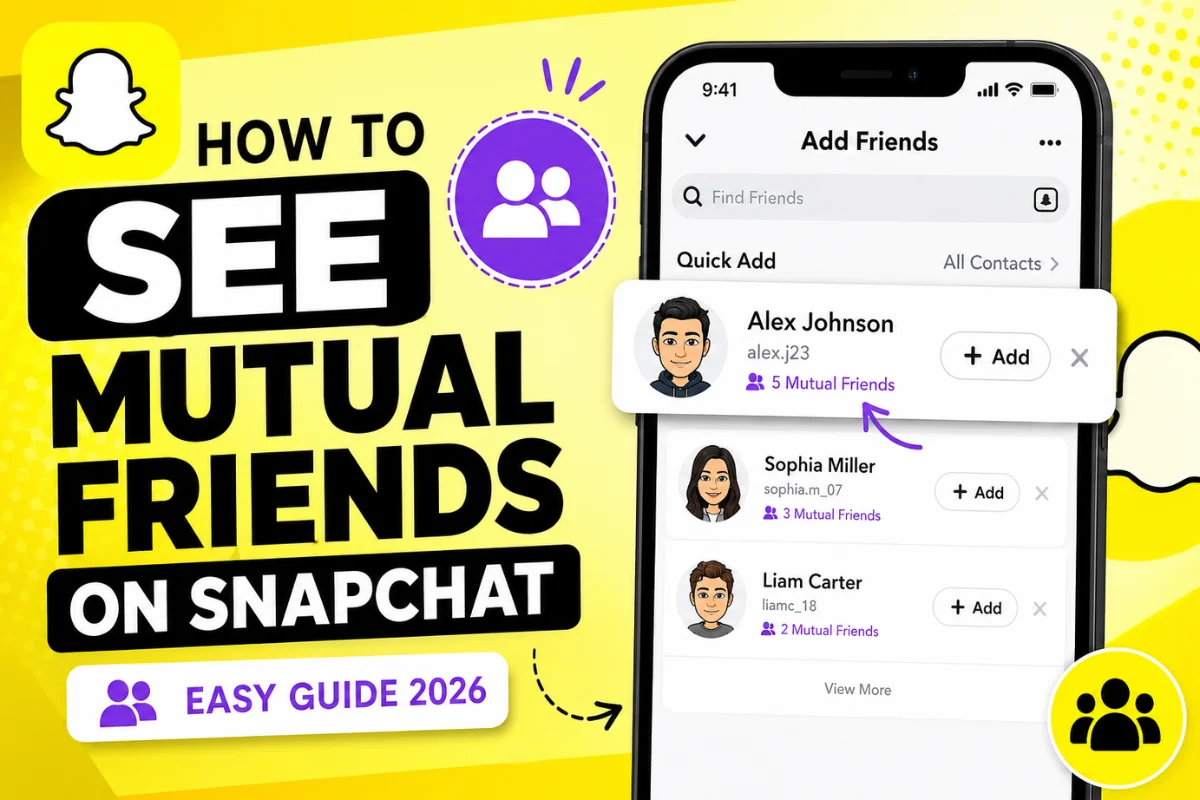
When Snapchat suggests someone in the Quick Add section, you may see a message like:
- “3 Mutual Friends”
- “5 Mutual Friends”
- “Added from Contacts”
- “Added by Search”
The app tells you how many mutual friends you share but does not reveal their names.
This helps users discover new people while protecting everyone’s privacy.
How to Check Mutual Friends on Snapchat
Although Snapchat doesn’t have a dedicated mutual friends page, you can check for shared connections by following these steps.
Method 1: Use Quick Add
This is the easiest method.
Steps
- Open Snapchat.
- Tap your Profile icon.
- Select Add Friends.
- Look under the Quick Add section.
- If Snapchat suggests someone because of shared connections, you’ll see text such as:
“4 Mutual Friends”
Unfortunately, Snapchat does not let you tap this number to see who those mutual friends are.
Method 2: Search for Someone
Sometimes searching for a username can also provide clues.
Steps
- Open Snapchat.
- Tap the search icon.
- Enter the person’s username.
- Open their profile if it appears.
If Snapchat recommends them because of shared friends, you may notice a mutual friend count before adding them.
Again, Snapchat keeps the actual identities private.
Method 3: Check Friend Suggestions
Snapchat regularly updates its friend suggestions.
Suggestions may be based on:
- Mutual friends
- Phone contacts
- Shared groups
- Shared location (if permissions are enabled)
- Recently interacted users
- Similar social connections
If someone keeps appearing in Quick Add, there’s a good chance you share multiple connections.
Why Doesn’t Snapchat Show Mutual Friends?
Privacy is one of Snapchat’s biggest priorities.
If everyone could view each other’s friend lists, users might feel less secure about their private social circles.
By hiding mutual friends, Snapchat helps:
- Protect personal relationships
- Reduce unwanted friend requests
- Prevent social profiling
- Improve user privacy
This privacy-first approach has remained consistent in recent Snapchat updates.
What Does “Mutual Friends” Mean on Snapchat?
A mutual friend is someone who is friends with both you and another Snapchat user.
For example:
- You are friends with Alex.
- Emma is also friends with Alex.
- You and Emma share one mutual friend.
Snapchat may tell you that you have 1 Mutual Friend, but it won’t tell you that the mutual friend is Alex.
Can Someone See If You Have Mutual Friends?
No. Other users cannot see your mutual friend list either.
Snapchat only displays the number of shared connections during friend recommendations.
No one can open your profile and view your friends.
Can You See Mutual Best Friends?
No. Snapchat previously had more visible Best Friends information years ago, but that feature has long been removed.
Today:
- Your Best Friends list is private.
- Other people’s Best Friends are private.
- Mutual Best Friends are not displayed.
Only Snapchat’s Friend Solar System (available with Snapchat+) gives you insights into your closest friendships, but it still doesn’t reveal mutual friend lists.
Can Third-Party Apps Show Mutual Friends?
Be careful. Some websites and apps claim they can reveal hidden Snapchat mutual friends.
These claims are misleading.
Using unofficial apps may:
- Compromise your account
- Violate Snapchat’s Terms of Service
- Put your personal information at risk
- Lead to account restrictions
It’s always safest to use Snapchat’s official features only.
Latest Snapchat Updates About Mutual Friends (2026)
As of 2026, Snapchat continues to prioritize user privacy.
Recent updates have focused on:
- Better friend recommendations
- Improved Quick Add suggestions
- Enhanced privacy controls
- Stronger account protection
- Smarter contact syncing
Despite these improvements, Snapchat still does not allow users to:
- View another person’s friend list
- See the names of mutual friends
- Browse shared friend connections
The only visible information remains the mutual friend count shown in eligible friend suggestions.
Why You Might Not See Mutual Friends
If you don’t see a mutual friend count, several reasons are possible.
These include:
- You don’t actually share any friends.
- The person isn’t appearing in Quick Add.
- Snapchat’s recommendation algorithm hasn’t suggested them yet.
- Privacy settings may affect recommendations.
- Your contacts aren’t synced.
Waiting a few days or refreshing Quick Add may sometimes change the suggestions.
Tips for Finding People on Snapchat
If you’re trying to connect with someone, these methods work better than searching for mutual friends.
You can:
- Search their exact username.
- Sync your phone contacts.
- Scan their Snapcode.
- Use a shared invitation link.
- Ask a mutual friend to share their username.
These are the official ways recommended by Snapchat.
Frequently Asked Questions
Can I see who my mutual friends are on Snapchat?
No. Snapchat only shows the number of mutual friends, not their names.
Can someone see my friend list?
No. Snapchat keeps your friend list private.
Does Snapchat Plus show mutual friends?
No. Snapchat+ includes extra features, but it does not reveal mutual friend names or friend lists.
Why does Snapchat say “3 Mutual Friends”?
It means you and that suggested user share three Snapchat friends, but Snapchat won’t identify who they are.
Are third-party mutual friend apps safe?
No. Avoid apps claiming to reveal hidden Snapchat data because they can compromise your account security.
Final Thoughts
Snapchat is built around privacy, which is why it doesn’t let users view mutual friend lists. While you may occasionally see a message like “2 Mutual Friends” in the Quick Add section, that’s the only information Snapchat shares. The names of those friends remain private.
If you’re looking to add someone, the safest approach is to use their username, Snapcode, or contact information. Avoid third-party tools that promise to reveal hidden mutual friends, as they are not supported by Snapchat and may put your account at risk.
As of the latest 2026 updates, Snapchat has improved friend recommendations and privacy features, but its stance on keeping mutual friends private remains unchanged.