How to Delete Snapchat Story in 2026?
Posted a Snapchat Story and immediately changed your mind? Maybe you shared the wrong photo, uploaded something by mistake, or simply do not want a particular Snap visible anymore. Whatever the reason, deleting a Snapchat Story is straightforward.
The important thing to know is that Snapchat does not currently provide a single button to erase every Snap from a regular Story at once. If your Story contains multiple Snaps, you need to delete them individually. Snapchat’s current support instructions confirm this process.
This guide explains how to delete a Snapchat Story, remove individual Snaps, and what happens after you delete them.
Can You Delete a Snapchat Story?
Yes. You can delete Snaps from your Snapchat Story whenever you want.
However, a Story is made up of individual Snaps. So, if you want to remove the entire Story, you need to delete each Snap that appears in it.
For example, if your Story has five photos or videos, you will need to remove those five Snaps individually.
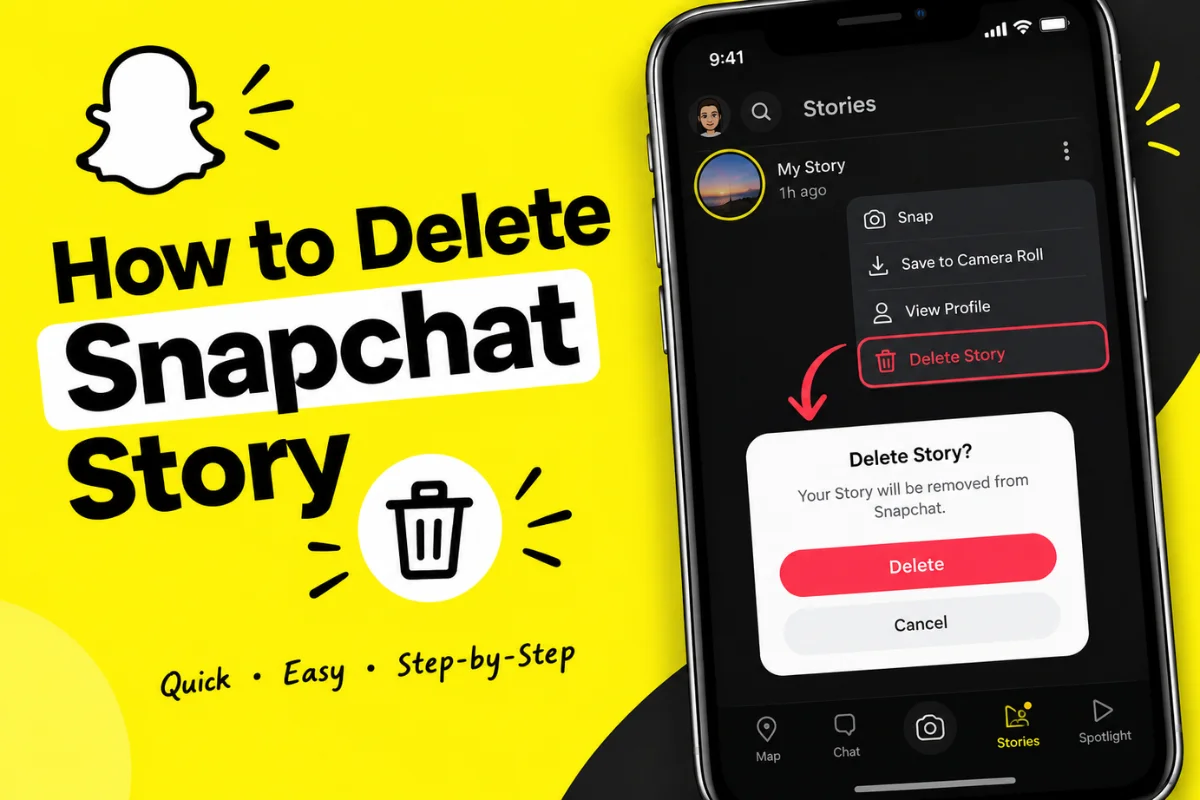
Snapchat’s current instructions are to open your account, select your Story, press and hold the Snap you want to remove, and choose Delete Snap.
How to Delete a Snapchat Story on Snapchat
Follow these steps if you want to remove a Snap from your regular My Story.
Step 1: Open Snapchat
Open the Snapchat app on your iPhone or Android phone and make sure you are signed in to the correct account.
Step 2: Open Your Profile
Tap your Bitmoji or Profile icon at the top of the screen.
This opens your account page, where you can see your Stories and other Snapchat content.
Step 3: Open My Story
Under My Stories, tap My Story.
Your currently active Story Snaps will appear.
Step 4: Find the Snap You Want to Delete
Open the specific photo or video that you no longer want to keep on your Story.
If you have posted several Snaps, move through the Story until you reach the one you want to remove.
Step 5: Delete the Snap
Press and hold the Snap, then tap Delete Snap.
Confirm the deletion if Snapchat asks you to do so.
The selected Snap will then be removed from your Story.
How to Delete the Entire Snapchat Story
If by “delete my Snapchat Story” you mean removing everything you have posted, the process is slightly different.
Snapchat currently requires you to delete the individual Snaps that make up your Story rather than providing one universal delete button for the entire regular Story.
For example:
- Open your Profile.
- Tap My Story.
- Open the first Snap.
- Press and hold it.
- Tap Delete Snap.
- Return to the remaining Snaps.
- Repeat the process until all unwanted Snaps are deleted.
Once all active Snaps have been removed, your regular Story will no longer contain those posts.
How to Delete One Photo or Video From Your Story
You do not have to delete your entire Story just because one Snap is wrong.
If you posted several photos and only one needs to be removed, open your Story and delete that particular Snap.
Snapchat also provides another route: open the Story, swipe up on the Snap you want to delete, then tap the trash can and select Delete.
This is useful when you want to keep the rest of your Story online.
Can You Delete a Snapchat Story After Someone Views It?
Yes.
You can delete a Snap even after friends or other viewers have already seen it.
Deleting the Snap removes it from your Story, but it cannot undo something another person has already seen, saved, screenshotted, or captured using another method.
Snapchat says it attempts to remove a deleted Snap from its servers and from friends’ devices. However, it warns that the Snap could remain visible briefly in some situations, such as when someone has a poor internet connection or an older version of Snapchat.
So, deleting a Story is not the same as making sure nobody ever saw or saved it.
What Happens When You Delete a Snapchat Story?
When you delete a Snap from your Story, Snapchat attempts to remove it from its servers and from the devices of people who received it.
There is an important limitation, though.
Someone could have already taken a screenshot, screen recording, or another photo of the screen. Snapchat cannot guarantee that copies made outside its system will disappear.
This is why it is best to remove unwanted content as soon as you notice it.
Does Snapchat Automatically Delete Stories?
Normally, Snaps posted to My Story are designed to disappear after about 24 hours.
The exact behavior can vary depending on your settings and the type of Story.
Snapchat’s current information says My Story Snaps usually expire after 24 hours, although certain settings and features can change how long they remain available.
For Snapchat+ subscribers, the My Story Timer can allow a Story Snap to expire after different periods, including 1 hour, 6 hours, 12 hours, 24 hours, 2 days, 3 days, or 1 week.
This is a useful option if you want more control over how long your Story stays visible.
What If You Want to Delete a Private or Shared Story?
Private and Shared Stories work a little differently from the standard My Story.
If you created a Private Story, you can delete the Snaps that you added to it.
Shared Stories also allow Snaps to be removed. Snapchat says that Shared Stories normally expire after 24 hours, although the timing can vary depending on settings.
If you created the Shared Story and delete the Story itself, the Snaps in that Story are deleted as well. However, other people may have already saved or captured content before deletion.
How to Delete a Snap From Snap Map
If you accidentally posted content to Snap Map or another public Snapchat location, the removal process is different.
Go to your Profile and find the Spotlight & Snap Map section. From there, you can view the Snaps you have submitted and use the trash option to delete one.
Snapchat says deleting the Snap can also remove it from Search, Context Cards, and Spotlight when a copy was shared there.
Keep in mind that public content may have already been shared outside Snapchat.
Can You Delete a Snapchat Story From a Computer?
Snapchat also provides web options for managing certain posts.
On the web, you can go to your Snapchat profile and manage posts under My Posts. Snapchat’s current support information says you can select a Snap under My Story or Spotlight Snaps and choose Download or Delete.
Some Public Profile deletion features may not be available through the web, so the mobile app remains the easiest option for most Story management.
What If the Delete Option Is Missing?
If you cannot find the delete option, first make sure you are viewing your own Story and the correct Snap.
You can also try updating Snapchat to the latest version and reopening the app.
If the problem continues, Snapchat provides a Bugs and Suggestions option inside Settings where you can report an issue.
Also remember that deleting app data or clearing your cache is not the same thing as deleting a Story. Your Story needs to be removed from the Story management screen.
Final Thoughts
Deleting a Snapchat Story is simple once you know where the option is. Open your Profile, go to My Story, select the unwanted Snap, and choose Delete Snap.
If your Story contains several Snaps, you currently need to remove them individually to clear the entire regular Story.
It is also worth remembering that deletion cannot erase screenshots or copies someone may have already made. If you post something by mistake, deleting it quickly is the best approach.