How to Half Swipe on Snapchat?
If you use Snapchat regularly, you may have heard of the half swipe. It is a popular technique that lets you preview a chat without fully opening the conversation.
Many people use it when they want to quickly check a message before deciding whether to reply. However, Snapchat has changed over time, so the trick is not always as reliable as it once was.
Here is what half swiping means, how to do it, and what you should know about it in 2026.
What Is a Half Swipe on Snapchat?
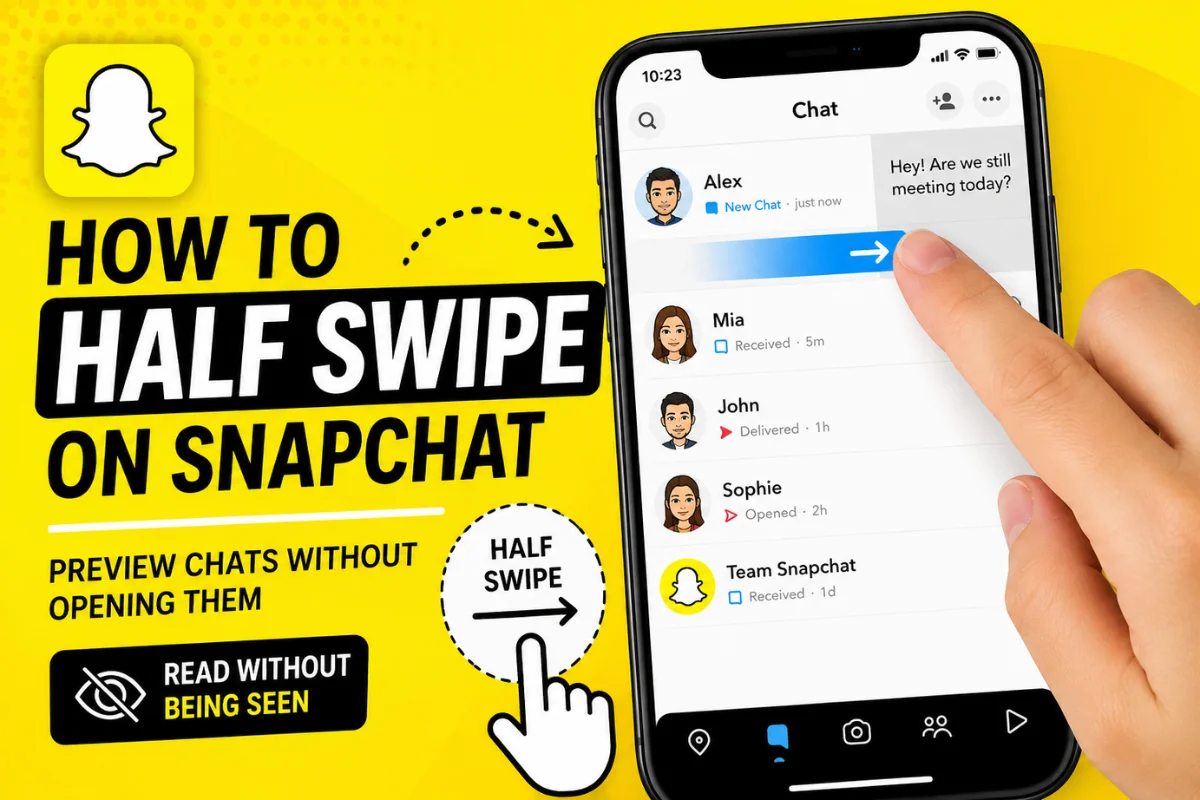
A half swipe is a way to partially open a Snapchat chat by dragging your finger across the conversation without completing the swipe.
The idea is simple: instead of tapping the chat and opening it normally, you press and hold on the sender’s Bitmoji or chat area and slowly drag toward the right.
This can allow you to preview part or all of a message while keeping the conversation from being fully opened.
It is important to understand that this is not an official Snapchat feature called “Half Swipe.” It is a gesture that users have traditionally used with Snapchat’s chat interface.
Why Do People Half Swipe on Snapchat?
The main reason people use half swipe is to check a message without immediately entering the conversation.
For example, someone might send you a message that requires a long response. You may want to know what they said before deciding when to reply.
Half swiping can also be useful when you are busy and only want to preview a message.
Some users use it because they do not want the sender to immediately assume that they are ready to respond.
How to Half Swipe on Snapchat
The basic technique is fairly simple, although it requires some practice.
Step 1: Open Snapchat
Open the Snapchat app on your iPhone or Android phone.
Make sure you are using the latest version. Snapchat recommends keeping the app updated because updates can change how features and chat functions work.
Step 2: Go to Your Chats
Swipe right from the camera screen or tap the Chat section to see your conversations.
Find the person whose message you want to preview.
Step 3: Press and Hold the Chat
Instead of tapping the conversation normally, place your finger on the person’s Bitmoji or chat area.
Keep your finger pressed on the screen.
Step 4: Slowly Swipe to the Right
While continuing to hold your finger down, slowly drag it toward the right.
Do not swipe all the way across the screen.
The chat should begin to appear as you move your finger.
Step 5: Read the Message
If the preview appears, read the available message while keeping your finger on the screen.
The key is to avoid completing the swipe.
Step 6: Move Your Finger Back
Once you have finished previewing the message, carefully move your finger back toward the left.
Release your finger only after returning to the original position.
This is the part that requires the most control. If you accidentally complete the gesture, Snapchat may open the conversation normally.
Does Half Swiping Still Work on Snapchat in 2026?
This is where things have become less straightforward.
The half-swipe method has traditionally worked because of the way Snapchat’s chat interface responds to a partial swipe. However, its behavior can vary between app versions, devices, and Snapchat updates.
Recent online reports suggest that half swiping has become less consistent for some users. Some users report that a small swipe can trigger the chat to be marked as opened, while others can still preview messages successfully.
Because Snapchat does not officially document half swiping as a supported feature, there is no guarantee that the technique will always work.
So, if you are trying it in 2026, treat it as a temporary interface behavior rather than a guaranteed Snapchat feature.
Can Someone Know If You Half Swiped?
If the half swipe works as intended and you do not fully open the conversation, the sender may not see the normal opened status.
However, you should not assume that every half swipe is invisible.
Snapchat’s interface and features can change, and accidentally completing the gesture can open the chat.
There is also a Snapchat+ feature called Peek a Peek that is specifically designed to show Snapchat+ subscribers when a friend is peeking into a shared one-to-one or group chat. Snapchat says subscribers can see an eyes emoji in the Chat feed when someone is peeking, and a Bitmoji may appear if they are already inside the chat.
That makes the old idea that half swiping is always completely undetectable outdated.
Half Swipe vs. Opening a Chat
There is an important difference between previewing a chat and opening it normally.
When you tap a conversation, Snapchat treats that interaction as opening the chat. Most Snapchat chats are designed around temporary content, and Snapchat says many messages are automatically deleted after they have been viewed or expire.
A half swipe attempts to preview the conversation without completing that normal opening action.
However, the result can depend on the current Snapchat version and how accurately you perform the gesture.
Common Mistakes When Half Swiping
Swiping Too Far
One of the biggest mistakes is moving your finger too far to the right.
If you complete the swipe, the chat may open.
Releasing Your Finger Too Early
Do not lift your finger while the chat is still partially open.
Move it back carefully before releasing.
Tapping Instead of Holding
A normal tap can open the conversation immediately.
The technique depends on pressing and holding while moving your finger.
Assuming It Always Works
This is perhaps the most important mistake.
Snapchat changes its interface regularly. A method that works on one version may behave differently after an update.
If the feature is important to you, test it with a low-risk conversation first rather than assuming the technique will work perfectly.
Does Half Swipe Work on iPhone and Android?
The basic gesture is intended to work through Snapchat’s touch interface, so users on both iPhone and Android may encounter the behavior.
However, the experience may not be identical on every device.
Screen size, operating-system version, Snapchat version, and interface changes can all affect how easily you can perform the gesture.
If half swiping suddenly stops working, check whether Snapchat has an available update. Snapchat itself recommends updating the app when chat features are not working correctly.
Is Half Swiping an Official Snapchat Feature?
No. Snapchat does not present “half swipe” as a standard feature in its official support documentation.
It is better described as a gesture or technique that developed from the way the Snapchat chat interface works.
This distinction matters because official features are generally documented and supported by Snapchat, while interface tricks can change or disappear after an update.
Final Thoughts
Half swiping can be a convenient way to preview Snapchat messages without immediately opening the full conversation.
The basic method is to press and hold a chat, slowly drag it toward the right, preview the message, and carefully return your finger before releasing.
However, half swipe Snapchat behavior is not guaranteed in 2026. Snapchat continues to update its app, and features such as Peek a Peek have also changed how users think about chat previews.
If you try the technique, be careful not to complete the swipe and remember that Snapchat can change how the gesture works at any time.